Imagine asking ChatGPT which digital marketing agency can boost your visibility. Or even, where can you get trustworthy skincare brands in India?
You can get recommendations from businesses, compare services and discover products. This provides an additional opportunity for companies to be included in the customer discovery process.
To take advantage of this, OpenAI launched Businesses in ChatGPT and Business Hub (in beta) on the 10th of November 2026. Eligible businesses can now claim their listings, update business information, offer product information and see how customers engage with them.
But what actually is a Business Hub? How do you claim your listing? Will being verified increase visibility? Can Indian businesses join?
Let’s break it down.
Quick Answer: What Is ChatGPT Business Hub?
ChatGPT Business Hub lets eligible businesses claim profiles, verify ownership, update information, share product feeds and access aggregated insights. Some can create Business Agents. Claiming does not guarantee higher rankings or recommendations.
What is ChatGPT Business Hub?
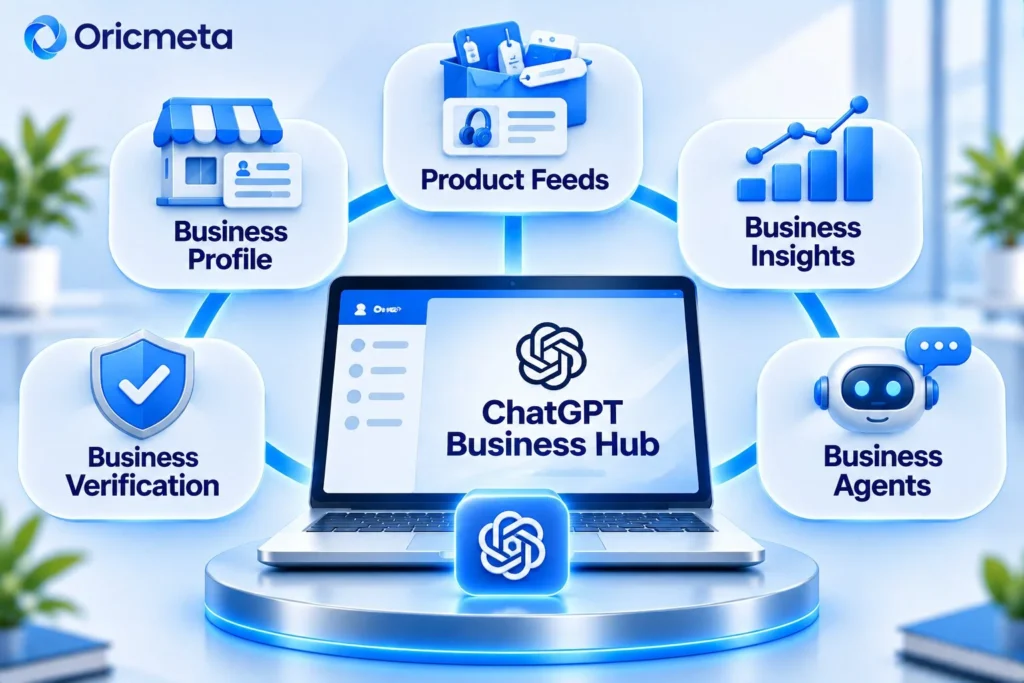
The ChatGPT Business Hub is a dedicated tool to help you manage your business on ChatGPT. It gives businesses more control over the information that ChatGPT uses. It allows eligible businesses to provide accurate information.
Businesses can do the following:
- Claim an existing business or add an eligible business.
- Confirm your relationship with the business.
- Edit descriptions, websites etc.
- Provide product information, prices and availability.
- Track mentions, website visits and topics of discovery.
- Create a Business Agent (if eligible).
Note: Please make sure you have claimed your business and completed Persona verification. To unlock extra features, you will need to be approved by Persona.
ChatGPT Business Hub – Features
| Feature | Description |
|---|---|
| Business Profile | Create a professional business profile |
| Business Verification | Verify that you represent the business with authority |
| Product Feeds | Publish product descriptions, pricing and availability |
| Business Hub Insights | Keep track of mentions, clicks and topics of discovery |
| Business Agents | Provide your customers with an AI assistant |
ChatGPT Business Agent
The Business Agent uses your business’s product information, policies and guidelines to answer customer questions. For example, if you run an online clothing store, a Business Agent could answer questions about sizing, availability, shipping and returns.
Customers can engage with your published agent to learn more about what you offer.
Currently this feature is available to eligible e-commerce and online service businesses based in the USA, but will be rolled out further.
How to Claim a Business on ChatGPT
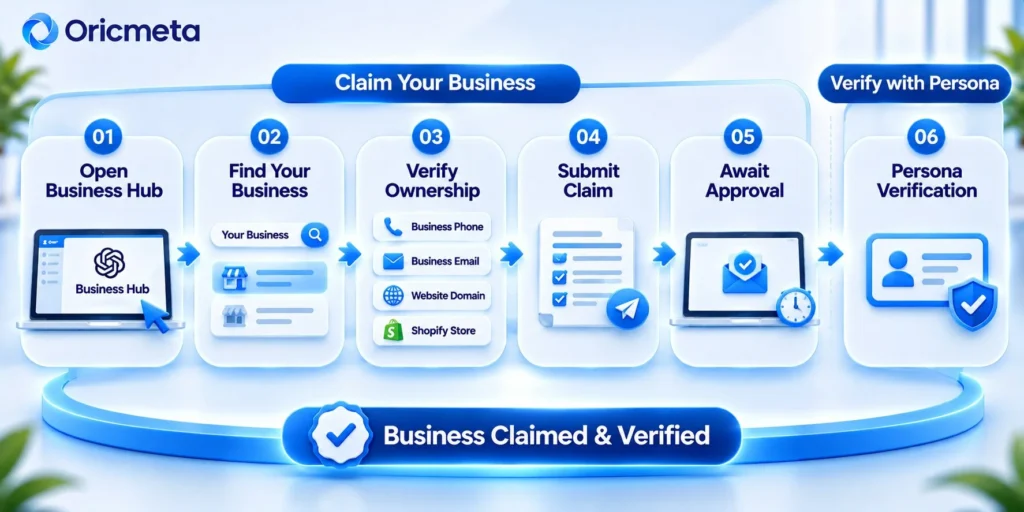
Follow these steps to claim a business:
Step 1: Open ChatGPT Business Hub
Login to your account and click on the Business Hub option in the sidebar.
Step 2: Search for your business.
Search using your official business name. Choose the right business from the results that appear. Check the information and choose the ChatGPT account that will manage the business.
Businesses with eligible online presences can create new profiles. However, local shops and restaurants can only claim existing US businesses at this time.
Step 3: Choose a verification method.
Choose an available method:
| Method | What You Need to Do |
| Business Phone | Receive an SMS or automated call. |
| Business Email | Enter a code sent to your business email. |
| Website Domain | Add OpenAI’s TXT record to your domain’s DNS settings. |
| Shopify Store | Connect your authorised Shopify account. |
Pro Tip: Be careful to copy the DNS TXT record information accurately including the type, host and value. It may take some time for changes to show.
Step 4: Submit your business claim.
Once you have verified your business, submit your claim. OpenAI will review your claim and send you an email confirming whether they have approved or ask for further information. If the business has been locked, choose the Contact Support option.
Step 5: Wait for approval.
Once approved you will have access to the Business Hub. However there is still one verification step to complete.
Verifying your ChatGPT Business Profile using Persona
Claiming your business and verifying your identity with Persona are 2 different steps.
Once your claim has been approved you might be asked to provide a government ID, business registration details and confirmation that you’re an authorised representative.
Log into the Business Hub and select your Business Profile. Select the ‘Verify with Persona’ option and follow the prompts to enter your details. Once submitted your details will be reviewed by OpenAI, who will email you their decision.
Once verified you’ll be able to:
- Update business information
- Link your product feeds
- View insights in the Business Hub
- Create a Business Agent (if applicable)
The blue verified icon is linked to successfully verifying your identity.
What If Your Business Has Been Claimed?
Use the ownership dispute tool from OpenAI.
- Open up your Business Profile and click on the 3 dots.
- Select ‘Dispute Ownership’.
- Follow the prompts from Persona to supply evidence that you’re an authorised representative.
This is useful if you are managing the listing due to previous employees or agencies..
Optimising Your ChatGPT Business Profile
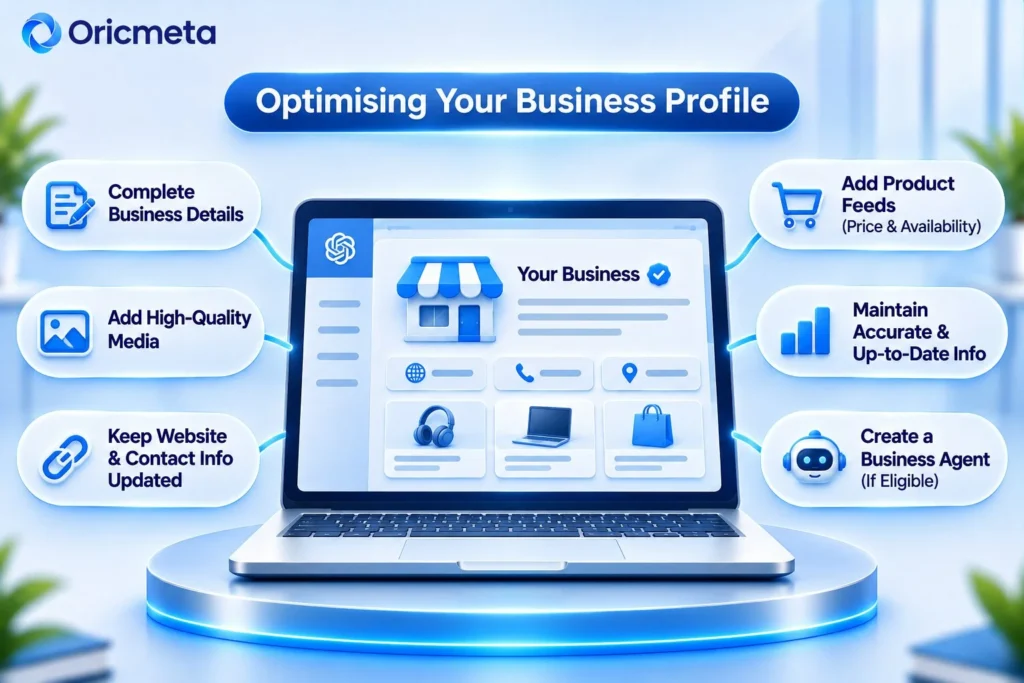
Once verified you will want to make sure you have optimised your business profile with accurate information.
After verifying your Persona you will want to complete the following:
| Profile Element | Recommended Response |
| Business Name | Official Brand Name |
| Website | Accurate Website URL |
| Description | Describe what products or services you offer |
| Category | Most relevant Category |
| Logo | Upload an HD Logo |
| Cover Image | Relevant and Professional Cover Image |
| Delivery Policy | Accurate Delivery Information |
| Returns Policy | Clear Returns Policy |
| Product Feed | Up to date information and pricing |
If you’re a marketing agency you will want to include SEO, AEO, GEO, Web Development and Performance Marketing as part of your services rather than digital solutions.
Retailers can utilise Shopify or CSV feeds (if applicable) and follow the guidelines set by OpenAI.
Please note that any amendments will be checked and it can take some time for these to show up in the responses. Other sources may be used.
Insights on ChatGPT Business Hub
For business owners, one of the best tools available is using the Business Hub Insights. This tool will provide you with insights into how many times your business has been mentioned in the ChatGPT tool, after passing claims and Persona.
The following can be measured:
| Metric | Description |
| Mentions | How often your business has been mentioned |
| Website clicks | How often users have clicked onto your website |
| Topics | Common themes found within the answers where your business is mentioned or cited. |
What counts as a mention?
- For online businesses, if the ChatGPT tool mentions your business website.
- For local businesses, if your business location is displayed.
Limitations:
- No individual prompts or conversations are provided.
- No specific search terms are provided from the topics.
- No confirmation that users made a purchase or enquiry from the website clicks.
- No data may be shown due to thresholds and delays with the reports.
To get a better understanding of how your business is performing, use Google Analytics and your current conversion tracking.
Does verification lead to better visibility on ChatGPT?
This is a commonly asked question.
Unfortunately, just because your business is verified doesn’t mean you’ll rank higher, be recommended and gain more visibility on ChatGPT.
While the Business Hub does allow verified businesses to add accurate information, a wider digital strategy will still be needed to increase visibility. You should focus on creating:
- Original valuable content on your website
- Technical website
- Uniform branding across platforms
- In-depth product/service pages
- Authoritative mentions and references
- Improved website performance
- Regularly updating key information
Your ChatGPT Business Hub should work along-ide your SEO, Answer Engine Optimisation (AEO) and Generative Engine Optimisation (GEO).
How does Oricmeta Technologies help Businesses Prepare for AI Search?
Having a ChatGPT Business Profile is a great first step but your website, content, brand reputation and technical SEO will all affect how your customers find you online.
We aim to improve your digital presence using a mix of marketing and technical methods.
| Service | How it helps |
| SEO | Improve website structure, content and organics. |
| AEO | Content structured around customer queries. |
| GEO | Create content and build your brand reputation for AI searches. |
| Web Development | Create responsive and technically sound websites. |
| Content Creation | Create useful blog posts, service pages and content. |
| Branding | Build a cohesive brand. |
| CRO | Improve website experience to drive enquiries. |
We can spot opportunities to improve your search, improve your technical SEO, create useful content and track real engagement.
We can help start-ups, e-commerce and B2B brands to compete in a changing search market.
Take a look at our SEO and Web development services.
Contact Oricmeta Technologies to help boost your visibility on Google, ChatGPT, Gemini and Perplexity.
Conclusion: Future Proof Your Business
ChatGPT Business Hub is an exciting development for AI driven business discovery. It allows eligible businesses to make claims to their listing, verify their ownership, update their details and showcase their products. Also, businesses can gain insights.
However, verification is not a growth strategy. Businesses should ensure they have accurate information alongside SEO, AEO, GEO, quality content and brand consistency.
We at Oricmeta Technologies create these foundations using SEO, AI search optimisation, website development, branding and performance marketing.
Customer discovery is advancing so make sure your business is prepared.
If you want to increase your visibility, reach out to us at Oricmeta Technologies.